Free Downloadable Client

The Caller 9 Connector

A small Windows app that links your studio's hybrids and on-hold music to Caller 9 over SIP. Install it once on a utility PC in your rack room, point it at a multi-channel sound card, and it quietly bridges callers to air — no console gear, no per-line hardware.
Caller9ConnectorSetup-0.1.0.exe·Windows 10 / 11 (64-bit)·Free with any Caller 9 plan

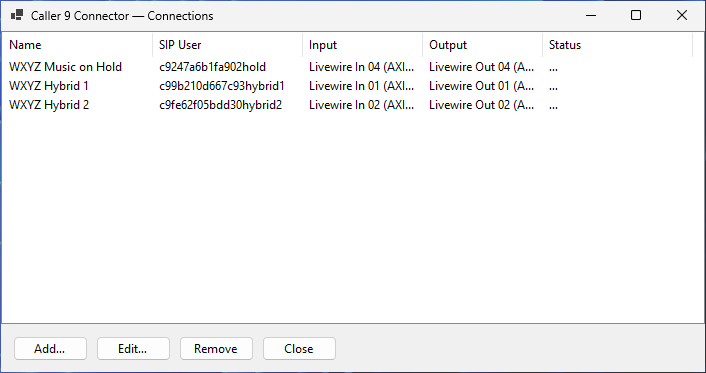
Caller 9 Connector app window listing three SIP connections — WXYZ Music on Hold, WXYZ Hybrid 1, and WXYZ Hybrid 2 — with their SIP users, input/output devices, and status.
What It Does

One app, two jobs

Every connection you add plays one of two roles for a studio, each configured from Caller 9 and each using its own pair of audio channels on your sound card.

Hybrid

The on-air leg. Caller audio comes out of a device you pick, straight into your console; your board's mic/program feed goes back in, so the caller hears the show. This is what lets Caller 9 put a phone caller on air through your existing board, with no phone-hybrid hardware.

PGM Music on Hold

A one-way feed — your station's program audio, or dedicated hold music — sent out to Caller 9 so held callers hear something better than silence or a canned loop while they wait to go on air.

Multiple connections, one PC

Add as many connections as you need — several hybrids, several studios' worth of on-hold feeds — all running from one utility computer with a multi-channel AoIP or USB interface in your rack.

Setup

Getting connected

Credentials come from Caller 9 itself — the Connector never asks you to invent anything.

01

Install on a rack-room PC

Run the installer on a utility computer that stays powered on in your rack room, with a multi-channel audio interface installed (AoIP, Dante, AES67, or a standard multi-channel USB/PCIe card all work — anything Windows sees as a sound device). The Connector runs quietly in the system tray and can start automatically with Windows.

02

Configure the Hybrid or PGM Hold in Caller 9

In the Caller 9 web console, set up a Hybrid or a PGM Music on Hold for the studio you're wiring up. Caller 9 generates a dedicated SIP Domain, SIP Username, and SIP Password for that connection — one set of credentials per Hybrid or hold feed.

SIP Domain SIP Username SIP Password
03

Add a connection in the Connector

Open the Connector's settings, add a new connection, and paste in the domain, username, and password from step 2. Give it a name you'll recognize later, like "Main Studio — Hybrid 1."

04

Pick the input and output devices

Choose which channels on your sound card this connection uses. A Hybrid needs both an input (board audio back to the caller) and an output (caller audio into the board); a PGM Hold feed only needs an output. Live level meters and a test tone help you confirm you've picked the right channels before saving.

05

Save — and repeat for every studio

The Connector registers to Caller 9 over SIP and shows Registered. Add another connection for the next Hybrid or studio's hold feed, wire it to a different pair of channels on the same interface, and it runs alongside the others — all from the one PC in the rack.

Under the Hood

Built for broadcast audio, not video calls

The Connector is a purpose-built SIP client, not a repurposed softphone — every default is chosen for on-air audio.

No echo cancellation, no noise suppression

Consumer calling apps quietly clean up your mic. That's exactly wrong for a board feed — the Connector passes audio through raw, untouched.

Auto-answer, single call per connection

Each connection answers instantly and holds one call at a time, so a Hybrid behaves exactly like a dedicated phone line into your board.

Encrypted credentials, quiet by design

SIP passwords are encrypted on your machine, never stored in plain text. No ringing, no pop-ups — just a tray icon that goes green when everything's connected.

FAQ

Common questions

What hardware do I need?

Any Windows 10/11 PC with a multi-channel audio interface — AoIP (Dante/AES67), or a multi-channel USB/PCIe sound card. Each Hybrid needs one input and one output channel pair; each PGM Hold feed needs one output channel.

How many connections can I run on one PC?

As many as your sound card has channels for. It's common to run every Hybrid and every studio's on-hold feed for an entire building from a single utility PC in the rack room.

Do I need to open any firewall ports?

The Connector only makes outbound connections to Caller 9, the same way a browser does — no inbound ports need to be opened on your network.

Where do I get the SIP Domain, Username, and Password?

They're generated automatically inside the Caller 9 console when you configure a Hybrid or a PGM Music on Hold for a studio. You don't need to create or manage them yourself.

Does the Connector cost anything?

No — it's a free download for any Caller 9 customer. It only does anything useful once it's registered against a Hybrid or PGM Hold you've set up in your Caller 9 account.

Is my audio affected by DSP like echo cancellation?

No. The Connector deliberately runs with no echo cancellation and no noise suppression, so your board feed arrives clean and untouched.

Ready to wire up your rack?

Download the Connector, then configure your first Hybrid or PGM Music on Hold from the Caller 9 console to get your SIP credentials.